Showing posts with label cool. Show all posts

Sunday, July 28, 2013

How To Scan A Website For Vulnerabilities Using BackTrack - Uniscan

FIRST YOU NEED BACKTRACK 5 , ANY BACKTRACK VERSION BUT I RECCOMMEND USE VERSION 5 :D

DOWNLOAD HERE : http://www.backtrack-linux.org/downloads/

Download Uniscan HERE
http://uniscan.sourceforge.net/?page_id=7


F.A.Q : HOW ABOUT IF IM NOT A LINUX USER ? 
ANSWER : JUST USE VMWARE WORKSTATION , YOU CAN DOWNLOAD IT HERE 

DOWNLOAD : http://expert2program.blogspot.com/2013/01/download-vmware-workstation-9-full-with.html OR http://www.saisoftwarecracks.com/2013/02/vmware-workstation-901-full-version.html#axzz2USM2CG11


OK LETS START :)

INTRODUCTION :
Hello guys, today I'm going to show you how to scan for vulnerabilities in a website, or all the websites in the server. In this tutorial I will use a program in BackTrack called UniScan. it's very easy to use, but very good in scanning.


1.First of all, open your terminal and type this command:
cd /pentest/web/uniscan && ./uniscan.pl
without Spaces and open and close parenthesis.

---------------
Something like this will be printed on your terminal. Now all we have to do is follow the instructions. First of all we need a target to scan, I've chose one already and I will use it in my pictures. To start the scan, first you have to check the options which you want to use in your scan.


2. HOW TO USE OPTIONS: Check the letter beside your option, and include it after the URL like this:  

./uniscan.pl -u http://www.website.com/ -b -q -d -w  

or put them all together

./uniscan.pl -u http://www.website.com/ -bqdw


3. This will start your scan with all the different options you included. NOTE:- NEVER FORGET THE FORWARD SLASH AT THE END OF THE LINK IN THE COMMEND!! Now the scan will start, and the terminal will look something like this :


-----------------------------------------------------------------------------
This scan will scan for vulnerabilities like SQL-i / LFI / RFI and so on. It also searches for Webshells, backdoors, PHP info disclosure, Emails, and much more. Here are some examples: 


PHP.info() disclosure:


External Links/Hosts:


Source Code disclosure:


Dynamic Scan, Vulnerability Identification:


=================================================================

4.This program can also get all the sites in a server, and then you will be able to scan all of them. To do that, run this command:
./uniscan.pl -i "ip:127.0.0.1"

5.Change 127.0.0.1 to your target server. All the websites will be stored in "sites.txt" in the same directory. Now to scan those sites in the list, run this command:
./uniscan.pl -f sites.txt -bqwd

6. You can change the options to whatever you want.
 Thats it guys, thank you for reading :)


ENJOY GUYS ! HAPPY EXPLOITING :D

Credits : SecurityGeeks :)

Other information about this tutorial added by xW3s13y

Wordpress Xploiter Released - First on Internet

Wordpress Xploiter is free Wordpress Vulnerability Scanner. It is the first version of Wordpress Xploiter.
This tool contains 251 Wordpress Exploit including latest Exploits Till date 28-5-13


Its the Latest Project by the Team Freak Coderz

Tool Info
Coded by :- Silent Hacker ( Manoj Nath ) And Un_N0n ( Gurender Singh )
Tool Nme :- Wordpress Xploiter v1.O

Team Has mentioned that the Exploits ( 237 ) taken from the WP-Scan 
You just need to provide the Website Link , First of all it looks for the WP-Version after that scans for the Vulnerable Plugins , If the Plugin found then it also gives the reference Link with it :)

[+] Latest 251 Exploits added

Download Now :- http://www.mediafire.com/download/7zhr3lcr7160kj1/WPXPLOITER_V1_BY_FREAK_CODERZ.ZIP

J.A.R.V.I.S Towards the Future - Interview


Hey Readers as all of you know that J.A.R.V.I.S is Inspired by Iron Man’s artificial intelligence assistant Jarvis, a student from India has taken a step forward to develop an AI computer similar to it of his own. A project which lets your computer come alive with Artificial Intelligence. A project Started by a group of 4 people working hard together to develop a very powerful Operating System which will let your imaginations come alive with their ideas.
Boot Up ScreenShot of J.A.R.V.I.S

So here D3vil Tech has grabbed an Interview with J.A.R.V.I.S developers who are currently working on this Project


-------------------------------------------------------------------------------------------------------------------------------------------------------------
D3vil Tech Interviewer
So first of all i want to ask you who brought the idea of J.A.R.V.I.S?

Chiragh Dewan
well i had thought of making it and then while researching about it when i saw a post by himanshu somewhere that even he started to work on it and wanted someone to help him with it. So i contacted him and we started to work

D3vil Tech Interviewer
ohh thatss great as you know J.A.R.V.I.S. is Tony Stark's artificially intelligent computer. It is programmed to speak with a male voice in a British accent so how will your Operating System recognise voice of other people i mean users

Chiragh Dewan
you mean differentiate between a males and females voice?

D3vil Tech Interviewer
ummmm yes

Chiragh Dewan
pitch of the voice

D3vil Tech Interviewer
and also if one wants to log on to their system with voice
see like i have a system with J.A.R.V.I.S installed on it and their are several users so
if i will say log on or something like that it will log in to my user account
so that no one else can copy my files something like security feature

Chiragh Dewan
well there are few options for that
if the user has the required hardware with the system, then it would open by a face scan
and if not we are making J.A.R.V.I.S in such a way that it would be able to distinguish between the users voice and the others, so, only when the user will say it would start

D3vil Tech Interviewer
which languages are being used for developing this Operating System?

Chiragh Dewan
well many different languages would be used but the main are C, Java, NPL, PHP and LISP.

D3vil Tech Interviewer
So basically J.A.R.V.I.S is focused on?

Chiragh Dewan
J.A.R.V.I.S is an OS so a particular thing on which it is focus is hard to say
As of now its hard to say, but all I can say at this time is that it would required a pretty decent system as the processing would be heavy

D3vil Tech Interviewer
what are basic requirments to use J.A.R.V.I.S like microphone, web cam and all?

Chiragh Dewan
microphone is necessary or how can someone speak to it , but ya web cam and the hardware for gestures and the other sensors would be necessary if the user wants to use it and tests it complete ability

D3vil Tech Interviewer
So will this os will be Paid or Free?

Chiragh Dewan
well that is something which we haven't discussed on. Right now our main focus is on completing it

D3vil Tech Interviewer
ohkkk so when are you gonna launch this amazing OS

Chiragh Dewan
sorry to disappoint you but even that is not sure. We are working with our full capacity

D3vil Tech Interviewer
"Perhaps, if you intend to visit other planets, we should improve the exosystems." as said by J.A.R.V.I.S will you also improve your OS after its V1.O ?

Chiragh Dewan
Definitely. We cant add everything in V 1.O. Also once its been launched we'll have to fix bugs(if found), add new features, etc.

D3vil Tech Interviewer
will it support third party applications?

Chiragh Dewan
yes, it will

D3vil Tech Interviewer
As you earlier shared in your site that J.A.R.V.I.S will come with Artificial Intelligence (AI) so will the system talk to the user?
if yes then how?

Chiragh Dewan
yes J.A.R.V.I.S will talk to the user and the sound will come from the speakers

D3vil Tech Interviewer
maybe we do not need any kind of mouse and keyboard as we are gonna use this operating system with our voice, am i right?

Chiragh Dewan
well a mouse and a keyboard is required, where we will try to eliminate the mouse in the later versions, but, even Tony Stark used a keyboard, so to eliminate it is something which I cannot promise at this stage

D3vil Tech Interviewer
so in the upcoming version of J.A.R.V.I.S mouse and keyboard will be required?

Chiragh Dewan
for some purposes, yes.
but mouse is something which we will try to eliminate in V 1.O

D3vil Tech Interviewer
Thanks for giving us your valuable time , i hope J.A.R.V.I.S will get a huge success

Chirag Dewan
Thanks a lot
-------------------------------------------------------------------------------------------------------------------------------------------------------------


"Apart from this, Chiragh Dewan promises that users can also remotely control Jarvis from their mobile phones and other tablet devices. He also tells us that Jarvis would be the first intelligent personal computer users can control via Voice, Gestures and Digital Inputs. He also states that we also need to set-up a private server for Jarvis in order for the computer to do all the ‘heavy’ processing work. This would also help it in running smoothly and remotely."~Tech Society

All the research papers for his project will soon be uploaded on his website. People who are interested in joining him on this project can contact him. His contact details are given below.
Facebook
E-mail: chiraghdewan@gmail.com
You can also visit his website here.


[How-To] Make a search box with Pure CSS for blogger!


If you are blogging, your blog is not complete without a search box. A search bar allows visitors to easily search content on your blog, and is certainly necessary. In this tutorial, I will teach you how to make a custom search bar for your site with pure CSS.

<style>
#devil-search-btn {
background:#0099ff;
color:white;
font: 'trebuchet ms', trebuchet;
padding:10px 20px;
border-radius:0 10px 10px 0;
-moz-border-radius:0 10px 10px 0;
-webkit-border-radius:0 10px 10px 0;
-o-border-radius:0 10px 10px 0;
border:0 none;
font-weight:bold;
}
#devil-search-box {
background: #eee;
padding:10px;
border-radius:10px 0 0 10px;
-moz-border-radius:10px 0 0 10px;
-webkit-border-radius:10px 0 0 10px;
-o-border-radius:10px 0 0 10px;
border:0 none;
width:160px;
}
</style>


<form id="searchthis" action="/search" style="display:inline;" method="get">
<input id="devil-search-box" name="q" size="40" type="text" placeholder=" Search any Keyword "/>
<input id="devil-search-btn" value="Search" type="submit"/>
</form>


How To use it


You have two ways of using this code.You can either paste this code where you want in edit html. 
Or, you can paste this code in a HTML/TEXT widget. I have used the second way, and that is recommended. To do that - 
  1. Click on ‘Layout’ tab. 
  2. Add a gadget in the sidebar or any other place.
  3. Paste all the code. 
  4. Save, you are done.

Tip: It is recommended that you save it without a title, it will look better that way.


Customize!

It is quite easy to customize the code. I will be listing different ways you can, and how to. 

Customize colors
To change the colors of the search button, press Ctrl+f and type “background:#0099ff;” and replace the hex code (#0099ff) with a color of your choice. 
To change the colors of the search box, press Ctrl+f to search, and type “background: #eee;” and replace the hex code (#eee) with a color of your choice.
Change font
To change the button font, press ctrl+f to search, and type “font” and then replace the fonts after it (trebuchet ms, trebuchet). If you replace with a font like times new roman, remember to enclose times new roman in single quotes (‘).
Change search box default text
To change the default text, search for “placeholder=”  Search any Keyword ”/>” and replace the text after placeholder= with your choice. It is recommended that you leave some spaces before the word, like I have done.
Change search box width
Just search for “width:160px;” and edit the number after width: , with the width of your choice. Remember, it is in pixels.

If you need anymore help, don’t hesitate to drop a comment. I will surely help you.
Also, if you liked it, please include a link to my blog in your blogroll. I will surely link back

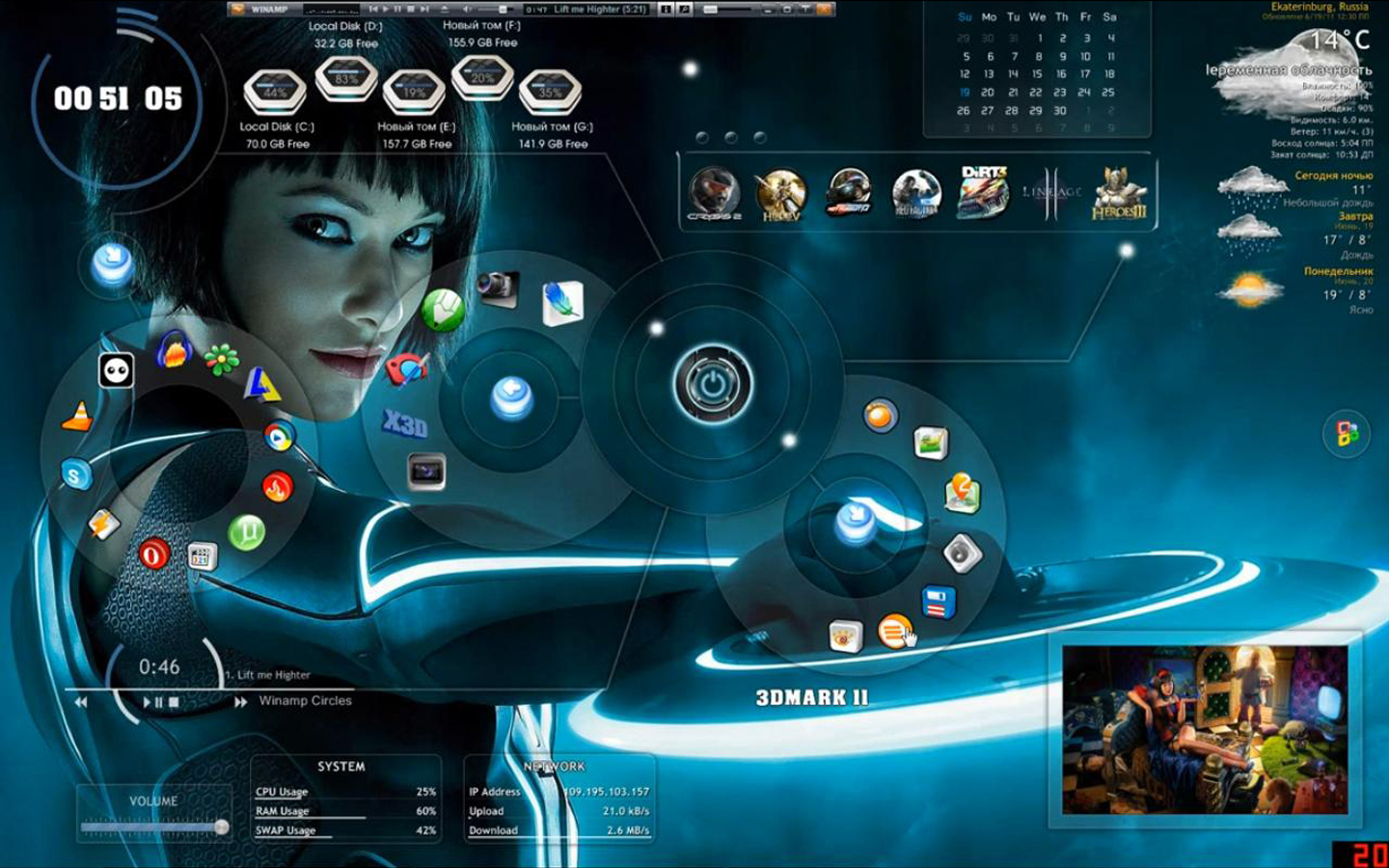
Tron Legacy Rainmeter Theme


Hey Readers! Today i was just googling Rainmeter Themes and I found this theme Tron Legacy Theme and I found this theme very impressive and nice looking so I thought to share it with you

Here's a Screen Shot of this theme


Here's the Download Link to this theme :
Tron Legacy Theme (D3vilTech).zip (25.0 MB)
https://mega.co.nz/#!MV9iHC7Q!IBChujll8fC0OkUdrzpRe0T5fUhDoER462x0zqXYjCo
Install this theme and have fun 

How To Install Themes Automatically
Skins in the Rainmeter Skin Packager (.rmskin) format can be easily and automatically installed with the Rainmeter Skin Installer. During a normal Rainmeter installation, the .rmskin extension is associated in Windows with the Skin Installer program, and simply double-clicking the file will install it in Rainmeter.
This dialog lists each component that will be installed. These may include:
  • Skins : At least one skin will always be included and installed in the Rainmeter\Skins folder. The author of the package may indicate that one or more skins will automatically be loaded when the installation is complete.
  • Layouts : If the author has added a layout to the package it will be installed in the Rainmeter\Layouts folder. IfApply included layout is selected, the layout will be applied to Rainmeter following installation.
  • Plugins : If the author has added custom plugins to the package the appropriate 32bit/64bit architecture version of the plugin .dll files will be installed to the Rainmeter\Plugins folder.
Legacy .rmskin format components. No longer supported in new Rainmeter 2.4 .rmskin files:
  • Fonts : If an author has included font files with the package, they will be installed in the Windows\Fonts folder. This may be disabled by unchecking Install fonts to system in the Advanced pull-down menu.
  • Addons : If an author has included addon executable files with the package, they will be installed in the Rainmeter\Addons folder.

If any of the skins to be installed already exist, they will be moved to a Backup folder before installation. This may be disabled by unchecking Backup skins in the Advanced pull-down menu.
Click Install to complete the installation of the package.